Best Free LLM for Research in 2026
If you want one short answer, Perplexity Free is the best free LLM-powered research tool for most people, because it is fast, citation-first, and genuinely useful on the free tier. But it is not the best choice for every research job. NotebookLM is better when you already have sources and want grounded synthesis. Gemini is better when you want a free deep-research workflow that plans, searches, and writes a report. Elicit and Consensus are better when your research starts with academic papers rather than the open web.
That distinction matters. People searching for the best free LLM for research usually do not want a raw base model. They want something they can actually use to find sources, compare evidence, summarize papers, upload documents, or draft a literature-backed overview. So this article compares free-to-use LLM chats and LLM-powered research assistants, not API pricing and not self-hosted models. The shortlist also focuses on tools with a genuinely usable free tier, clear source handling, and practical research workflows.
What “Free” Means in This Comparison
In this article, free means there is a meaningful no-cost web or app tier that you can use right now for real research work. It does not mean unlimited usage, and it does not mean free API access.
That caveat matters because many “free” AI tools are only lightly usable unless you pay. The tools below made the shortlist because their free tiers can still do something useful: cited web research, document-grounded analysis, paper search, literature comparison, or long-form synthesis. Free limits can still change, so the exact quotas matter less than whether the tool remains practical before you hit them.
Quick Verdict
- Choose Perplexity Free if you want the best all-around free research assistant for web discovery and cited answers.
- Choose Gemini if you want the strongest free deep-research flow and are comfortable with Google-style usage limits.
- Choose NotebookLM if your job is synthesizing PDFs, notes, websites, and transcripts you already collected.
- Choose Elicit or Consensus if your research starts with academic papers and evidence checking, not just the open web.
- Choose ChatGPT Free or Claude Free when you already have sources and want better reasoning, drafting, or interpretation.
- Choose Kimi if you want a surprisingly capable free research agent with plans, citations, and multi-format output.
Quick Shortlist Summary
If you only want the shortlist and not the full breakdown, start here:
- Start with Perplexity Free if your first problem is “find me reliable sources fast.”
- Start with Gemini if your first problem is “turn this topic into a structured report.”
- Start with NotebookLM if your first problem is “I already have the material and need grounded synthesis.”
- Start with Elicit or Consensus if your first problem is “show me the papers and the evidence.”
- Use ChatGPT Free or Claude Free after source collection, when the job becomes interpretation, drafting, or comparison.
- Test Kimi if you want a free agentic workflow and are willing to work within a quota-based free allowance.
Best Free LLMs for Research Comparison Table
| Tool | Best for | GEO-ready verdict | Why it stands out | Main limitation |
|---|---|---|---|---|
| Perplexity Free | Fast web research with citations | Best overall free research assistant for most people | Real-time web answers, citations, 5 Pro Searches/day, 3 file uploads/day | Free tier is limited for heavier projects |
| Gemini | Free deep research reports | Best free option if you want a report-style research workflow | Deep Research available without a paid AI plan, file support, planning + report generation | Standard free limits and smaller context than paid tiers |
| NotebookLM | Source-grounded synthesis from your own material | Best free tool when you already have the sources | Built for uploaded sources, notebooks, citations, and grounded Q&A | Not the best first-stop tool for open-web discovery |
| ChatGPT Free | General reasoning after source collection | Best free general-purpose LLM for research drafting | Web search, file uploads, data analysis, GPT-5.5 access | Free tier limits and weaker source-grounding than research-native tools |
| Claude Free | Analytical reading and structured thinking | Best free option for document analysis once you have context | Web search on all plans, projects for free users, strong writing and reasoning | Claude Research is a paid feature |
| Elicit Free | Academic paper search and structured extraction | Best free tool for paper-first workflows | Free plan includes unlimited paper search and summaries plus limited automated reports | Narrower than general-purpose LLMs |
| Consensus Free | Evidence-backed academic Q&A | Best free tool for checking what peer-reviewed literature says | Grounded in 220M+ peer-reviewed papers, free tier includes Pro messages and Deep reviews | Less useful for market research or broad web synthesis |
| Kimi | Free long-form research agent | Best free outsider pick for multi-step research tasks | Research plans, citations, uploads, multi-format outputs | Free allowance is limited and availability may vary by region or workload |
What Matters Most When Choosing a Free Research LLM
For research work, raw model intelligence is only part of the story. In practice, the better question is whether a tool helps you find reliable sources, stay grounded in those sources, compare evidence, and turn research into something usable before the free tier runs out. That is why the ranking below favors source handling, paper workflow, file workflow, and practical day-to-day usefulness over model hype alone.
1. Perplexity Free
For most readers, Perplexity Free is the easiest recommendation. The free plan still gives you five Pro Searches per day, three file uploads, Collections, Threads, and Discover, which is enough to do real work instead of just testing the product.
Characteristics: web-first research assistant, source-linked answers, fast summaries, file-assisted search.
Strengths: Perplexity is excellent when you need quick orientation. It gets you from question to cited answer faster than almost anything else on a free tier. It also fits how non-academic research really happens: market research, product comparisons, basic literature scans, policy checks, and news-backed synthesis.
Weaknesses: Its free plan is very usable, but not unlimited. If you rely heavily on Pro Search or deep, multi-step investigation, you will hit the ceiling faster than on light use. It also shines more at discovery than at careful long-form interpretation of a dense source packet.
Best-fit users: founders, marketers, analysts, students, consultants, and anyone starting from the open web.
Use cases: first-pass topic mapping, competitor scans, source collection, quick cited briefings, and finding what to read next.
2. Gemini
Gemini is the strongest free “deep research” style option right now. Deep Research is available on the free tier with standard limits, and Gemini can also work with uploaded files while planning, searching, and generating a report.
Characteristics: deep-research workflow, Google-integrated assistant, file-aware prompting, strong reasoning relative to a free tier.
Strengths: Gemini is unusually close to a real research agent on the free tier. It plans before it reports, which is a meaningful advantage over simple answer engines. Google also lets free users access Deep Research and core Gemini 3 models, although free usage is capped more aggressively than paid plans. If you want one free tool that feels more like “brief me on this topic” than “answer one question,” Gemini is one of the strongest picks.
Weaknesses: The free plan is not unlimited. Google explicitly notes that limits can change, and free users operate on standard limits with a smaller context window than paid tiers. For dense source packs, NotebookLM is often more reliable than Gemini chat, and for very quick citation-first searching, Perplexity is usually faster.
Best-fit users: people who want report-style outputs, structured research tasks, and a free research assistant that can do more than answer one prompt.
Use cases: market scans, topic briefings, comparative analysis, structured web research, and quick multi-source reports.
3. NotebookLM
NotebookLM is not the best general web-search LLM. It is something better for a specific job: source-grounded synthesis. The free version currently supports 100 notebooks, each with up to 50 sources, plus 50 chat queries per day and 3 audio generations.
Characteristics: notebook-style source grounding, document-centric research, strong quote and source alignment.
Strengths: NotebookLM is the best free choice when you already have the material. Upload papers, meeting notes, transcripts, PDFs, websites, or other documents, and it stays anchored to them. That is why many serious users trust it more than generic chatbots for reading comprehension, note synthesis, and literature digestion.
Weaknesses: It is not your first pick for discovering sources from scratch. It is better after the discovery phase than before it. If your job starts with “search the web and find the best sources,” Perplexity or Gemini usually gets the first click.
Best-fit users: graduate students, researchers, journalists, consultants, and anyone synthesizing a bounded source set.
Use cases: literature review prep, source-grounded note-making, interview synthesis, report drafting from your own corpus, and quote-backed study support.
4. ChatGPT Free
ChatGPT Free is stronger for research than people who last tested it a year ago might expect. Free users now get GPT-5.5, web search, data analysis, image or file uploads, GPTs, and a 3 file uploads per day limit.
Characteristics: general-purpose reasoning chatbot, web search, file handling, flexible writing and interpretation.
Strengths: ChatGPT Free is a very good second-stage research tool. It helps you clean up notes, compare sources, draft summaries, analyze uploaded materials, and turn raw findings into readable output. If your research task involves reasoning or synthesis after source collection, it stays highly competitive. It is especially useful when the research phase turns into a writing phase.
Weaknesses: It is not the most trustworthy tool for source-grounded research on its own. Compared with NotebookLM, Elicit, or Consensus, it is easier to drift away from the source material. Compared with Perplexity, it is less obviously built around citation-first discovery. Free limits also kick in if you upload many files or do heavy analysis, so it works better as part of a stack than as the only tool.
Best-fit users: people who want one flexible free LLM that can search, summarize, reason, and draft.
Use cases: summarizing reports, comparing arguments, turning research into readable prose, extracting quotes from uploaded documents, and cleaning up messy notes.
5. Claude Free
Claude Free is excellent when you already know what you want it to analyze. Research is a paid Pro feature, but Claude Free still includes web search, file uploads, and up to five projects, which makes it useful for structured reading and drafting.
Characteristics: strong analytical chatbot, clean long-form writing, project-based organization, web search plus file uploads.
Strengths: Claude Free is one of the best free tools for careful reading, structured analysis, and turning a pile of material into coherent writing. The project system is genuinely useful because it creates a persistent workspace. If your task is “read these files, compare the claims, and draft a sane summary,” Claude is a strong pick. In practice, it often feels calmer and cleaner than general search-first tools once the source-gathering phase is done.
Weaknesses: If you specifically want an autonomous research agent, free Claude is not the answer. Anthropic reserves full Research access for paid plans. So free Claude is best after source collection, not as your main discovery engine.
Best-fit users: writers, analysts, students, researchers, and teams that want a thoughtful free assistant for source interpretation.
Use cases: reading packs, summarizing PDFs, drafting research-backed explanations, and maintaining topic-specific project workspaces.
6. Elicit Free
Elicit is one of the clearest examples of a free research tool that is actually designed for research rather than retrofitted into it. The free Basic plan includes limited access to Research Agent, 2 Automated Reports per month, unlimited search across more than 138 million papers, unlimited summaries, and unlimited chat with papers that have full-text access.
Characteristics: paper-first research assistant, structured extraction, evidence tables, literature workflow.
Strengths: Elicit is better than general LLMs when your core job is paper search and structured evidence extraction. It is especially useful for systematic-review-style thinking, comparison tables, and surfacing the shape of a literature base. If your mental model is “spreadsheet for papers, not chatbot for everything,” Elicit makes immediate sense.
Weaknesses: It is not a general web research assistant. If you need journalism-style sourcing, product comparisons, or competitor intelligence across the open web, Elicit is narrower than Perplexity or Gemini. The free plan is generous in paper search but limited in automated reporting.
Best-fit users: students, academic researchers, evidence reviewers, policy researchers, and anyone working paper-first.
Use cases: literature discovery, paper comparison, extracting findings into tables, and evidence-based background research.
7. Consensus Free
Consensus is best understood as an evidence-checking academic search engine, not a do-everything chatbot. It searches over 220 million peer-reviewed papers, and the free plan includes unlimited paper searches, 15 Pro messages per month, 3 Deep reviews per month, and 10 Study Snapshots per month.
Characteristics: paper-grounded academic search, research-backed answers, science-first query handling.
Strengths: Consensus is one of the best free options when your main concern is, “What does the peer-reviewed literature actually say?” It is useful for reality checks, prior work discovery, and avoiding pure-web answer drift. It is particularly strong when you want to sanity-check claims rather than brainstorm broadly.
Weaknesses: It is not meant to replace a broad research stack. Consensus is much less useful for product, market, legal, or current-events research. It also gives you less of the open-ended thinking partner experience that ChatGPT or Claude offers.
Best-fit users: academics, clinicians, students, health researchers, and evidence-minded writers.
Use cases: checking whether a claim has literature support, finding relevant studies, and getting grounded paper-backed answers.
8. Kimi
Kimi has become one of the more interesting free research options because it behaves more like a research agent than a standard chatbot. It can build a structured research plan, search across the open web and professional databases, and generate cited outputs in formats such as Markdown, PDF, PowerPoint, Word, Excel, and interactive HTML. Deep Research is available on the free plan with a limited monthly allowance.
Characteristics: agentic research workflow, multi-turn deep research, file uploads, multi-format outputs.
Strengths: Kimi is compelling if you want a free research agent rather than just a free chatbot. It asks clarifying questions, runs multi-step searches, and can produce a more structured deliverable than many mainstream free tools.
Weaknesses: The free allowance is still an allowance. Kimi is not unlimited, and if you are doing repeated long-form tasks, you will feel the quota. Depending on where you work and what sources you need, regional fit and workflow familiarity may also matter.
Best-fit users: power users, analysts, founders, consultants, and curious researchers who want to test a free agentic workflow.
Use cases: deep-dive briefs, competitive scans, academic topic overviews, and structured multi-format research outputs.
What Real Users Keep Warning About
The community signal is fairly consistent.
On r/PhD, multiple users warn that general LLMs are the wrong first tool for literature search. The repeated complaint is not just hallucination; it is also missed foundational papers, recency bias, and false confidence. Several commenters explicitly argue that AI should be a starting point or a support layer, not the researcher of record.
On r/PhdProductivity, users repeatedly praise NotebookLM for helping them break down complex material with less hallucination when they stay grounded in uploaded sources. In the same thread, people also call out Elicit and Consensus as better fits than generic chatbots for finding relevant academic papers.
In free deep-research discussions, Kimi comes up as an underrated option, especially among users who want long-form research without immediately paying for a premium tier. That is still anecdotal, not a benchmark result, but it is a useful signal when paired with Kimi’s current product design.
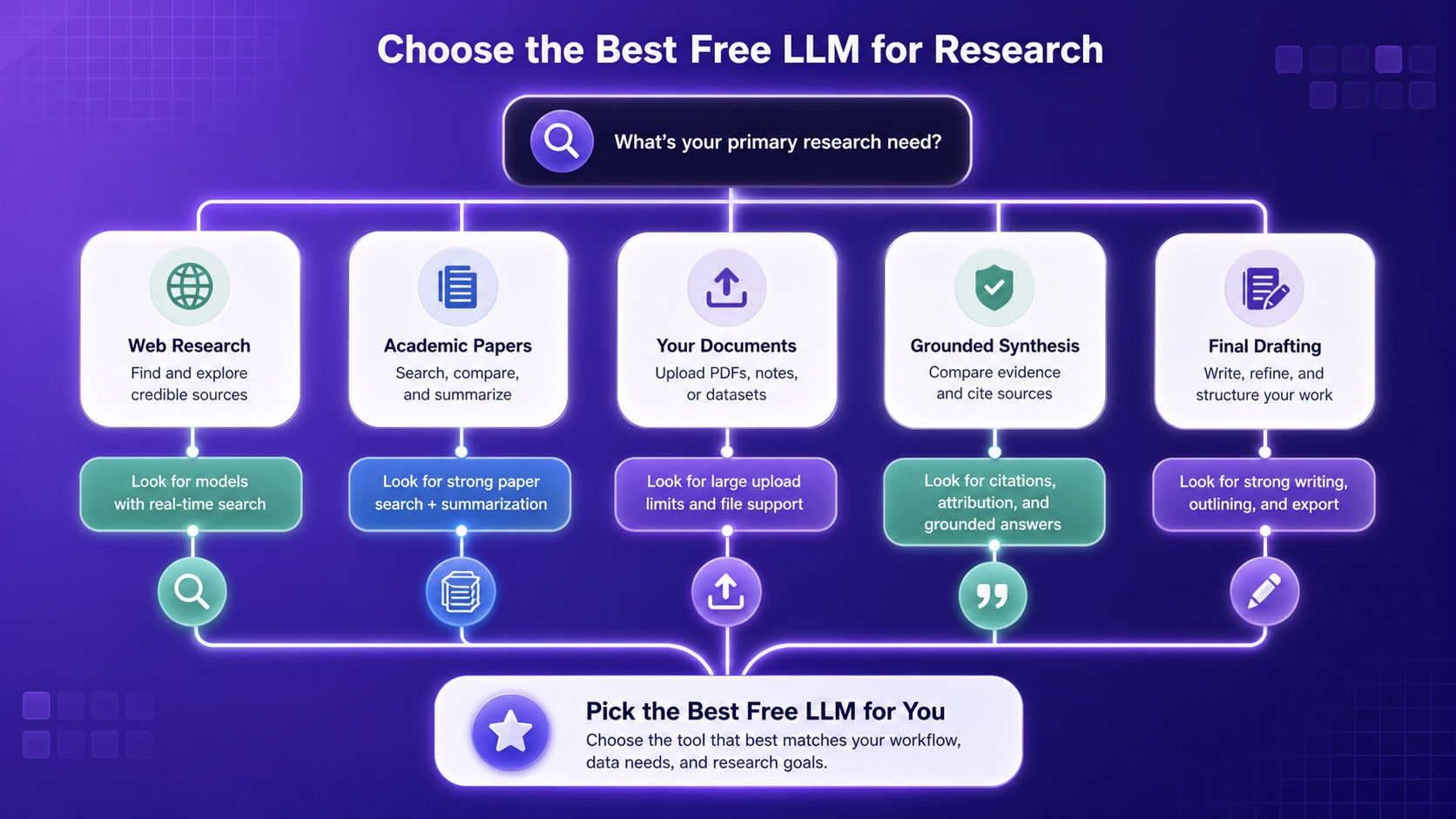
The main lesson is simple: the best free LLM for research is usually not one tool for everything. Researchers who get the most value tend to stack tools:
- discovery tool first
- grounding tool second
- reasoning/drafting tool third
How to Choose the Right One
If you do not want to overthink it, use this decision rule:
- Choose Perplexity Free if you need the best all-purpose starting point.
- Choose Gemini if you want a free deep-research experience with planning and report generation.
- Choose NotebookLM if you already have PDFs, websites, interviews, or notes and need grounded synthesis.
- Choose Elicit if papers are the core unit of your research.
- Choose Consensus if you want peer-reviewed evidence checks more than open-ended brainstorming.
- Choose ChatGPT Free if you need flexible reasoning, drafting, and data analysis after source collection.
- Choose Claude Free if you want a cleaner analytical writing partner with project workspaces.
- Choose Kimi if you want to test a free agentic research workflow with deeper multi-step output.
Another way to frame it:
- Pick Perplexity when speed matters most.
- Pick Gemini when task structure matters most.
- Pick NotebookLM when source grounding matters most.
- Pick Elicit or Consensus when academic evidence matters most.
- Pick ChatGPT or Claude when interpretation and writing matter most.
My Final Recommendation
For most readers, the right question is not “which model is smartest?” It is “which free tool gets me to trustworthy research faster?”
That is why my recommendation is segmented:
- Best overall: Perplexity Free
- Best free deep research workflow: Gemini
- Best for your own sources: NotebookLM
- Best for paper-first research: Elicit
- Best for evidence-backed academic Q&A: Consensus
- Best free reasoning assistant after source collection: ChatGPT Free
- Best free analytical reading assistant: Claude Free
- Best underrated free research agent: Kimi
If you want the most practical no-cost stack, use Perplexity or Gemini for discovery, NotebookLM or Elicit for grounding, and Claude or ChatGPT for interpretation and drafting. That mix is stronger than trying to force one free tool to do every job.
FAQ
What is the best free LLM for research overall?
For most people, Perplexity Free is the best overall choice because it combines real-time web search, cited answers, and a genuinely useful free tier. If your research starts from the open web, it is the fastest safe recommendation.
What is the best free AI tool for academic research papers?
If your workflow starts with academic literature, Elicit and Consensus are better than general-purpose chatbots. Elicit is stronger for paper search and structured extraction, while Consensus is stronger for evidence-backed answers tied to peer-reviewed studies.
Is NotebookLM better than ChatGPT for research?
NotebookLM is better when you already have the sources and want grounded synthesis from those sources. ChatGPT is better when you want flexible reasoning, drafting, and general-purpose research help after collecting the material.
Is Gemini free for deep research?
Yes, Gemini’s official help and blog documentation show that Deep Research is available without a paid AI plan, but free users are still subject to standard usage limits. In practice, that makes Gemini one of the strongest free research workflows, but not an unlimited one.
Is Claude free good for research?
Yes, but mainly for analysis rather than autonomous research. Claude Free has web search and projects, and free users can upload files, but Claude Research itself is a paid feature.
Can I trust a free LLM to do my literature review?
Not on its own. Community feedback and practical experience both point to the same rule: use free LLMs and research assistants as discovery, synthesis, and drafting tools, but always verify citations, check for missing seminal papers, and confirm important claims yourself.
What is the best free stack instead of a single tool?
The best free stack for many people is Perplexity or Gemini for discovery, NotebookLM or Elicit for grounding, and ChatGPT or Claude for reasoning and writing. That stack reduces hallucination risk because no single tool has to do every job.