Kimi K3 Review: Benchmarks, API Price and Community Demos
Kimi K3 is Moonshot AI’s 2.8-trillion-parameter flagship model for long-horizon coding, knowledge work, multimodal reasoning, and agent tasks. This review covers its specifications, Kimi K3 benchmarks, API price, TokenHub and OpenCode setup, community demos, and focused comparisons with Claude Fable 5, Opus 4.8, and GLM-5.2.
The short version: Kimi K3’s 1-million-token context window, native vision, and early benchmark results make it worth testing for large codebases, long documents, visual development, and research. A production decision should still depend on task quality, latency, cost, and reliability in your own workflow.
Quick access: Try Kimi K3 through TokenHub using a single API key and an OpenAI-compatible endpoint.
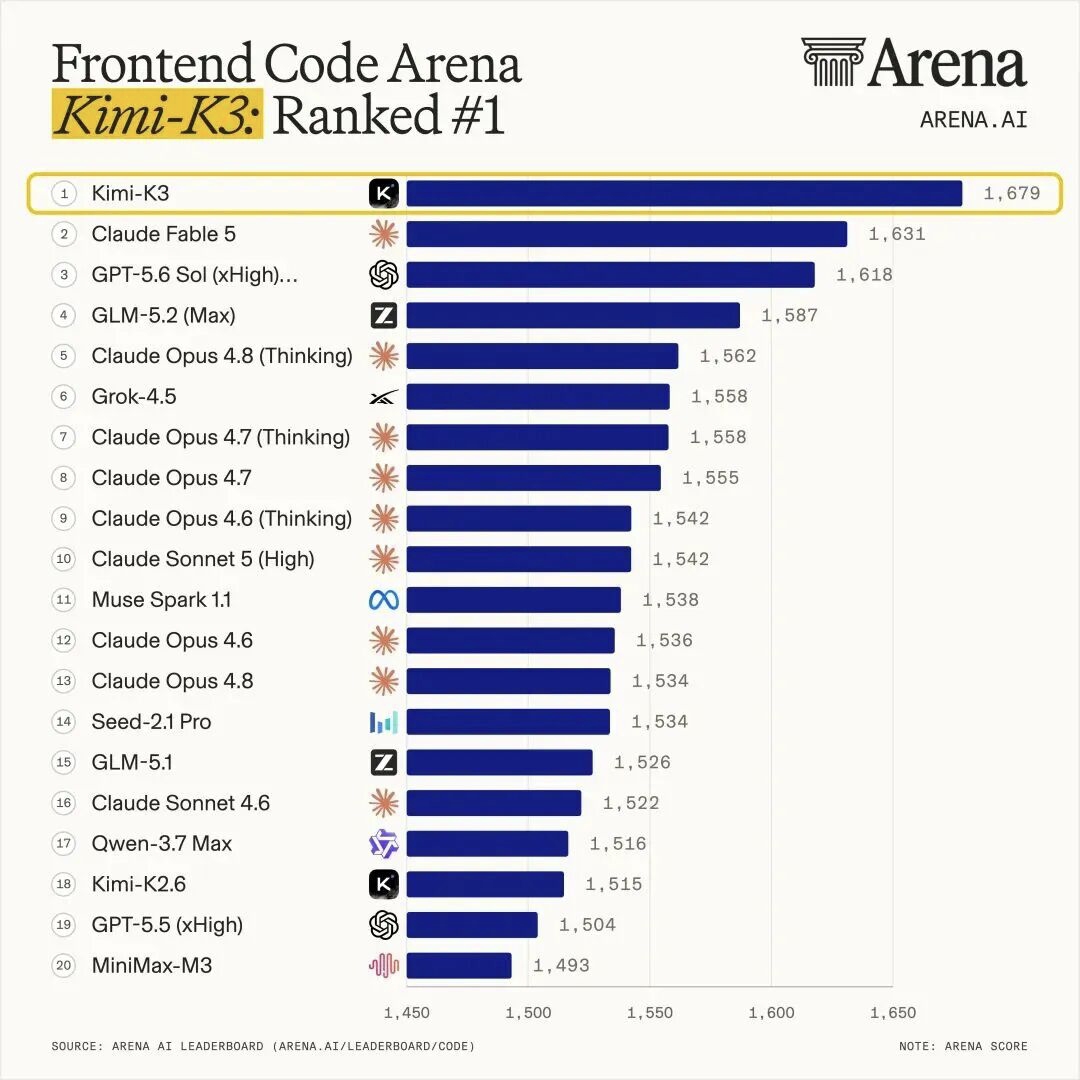
What Is Kimi K3?
Released on July 16, 2026, Kimi K3 is Moonshot AI’s most capable model as of this review. Its sparse Mixture-of-Experts design activates 16 of 896 experts per token rather than using all 2.8 trillion parameters for every request. Kimi Delta Attention and Attention Residuals are designed to improve efficiency across long sequences and model depth.
Kimi K3 Specifications and Launch Details
| Specification | Kimi K3 |
|---|---|
| Developer | Moonshot AI |
| Release date | July 16, 2026 |
| Architecture | Sparse Mixture of Experts |
| Total parameters | 2.8 trillion |
| Expert configuration | 16 of 896 experts activated per token |
| Context window | Up to 1,048,576 tokens |
| Native input modalities | Text, image, and visual/video context |
| Primary workloads | Coding, research, knowledge work, agents, long documents |
| Reasoning levels | Low, high, and max, depending on access method |
| TokenHub model ID | kimi-k3 |
| TokenHub maximum output | 131.1K tokens |
| TokenHub endpoints | /v1/chat/completions and /v1/messages |
| Full-weight release | Scheduled for July 27, 2026 |
Moonshot says the new architecture and training recipe provide approximately 2.5 times better overall scaling efficiency than Kimi K2. Kimi K3 also uses quantization-aware training with MXFP4 weights and MXFP8 activations. Despite its sparse activation, self-hosting a model of this size is still an infrastructure-heavy project rather than a typical local-LLM setup.
Kimi K3 Benchmarks: What the Early Numbers Show
The TokenHub model page currently lists the following metrics sourced from Artificial Analysis:
| Benchmark | Kimi K3 score | What it measures |
|---|---|---|
| Artificial Analysis Intelligence Index | 57.1/100 | Broad model capability |
| Artificial Analysis Coding Index | 76.2/100 | Coding and software engineering |
| GPQA | 93.5% | Graduate-level science reasoning |
| HLE | 44.3% | Broad expert-level knowledge |
| SciCode | 58.7% | Scientific Python programming |
| AA-LCR | 74.7% | Long-context reasoning |
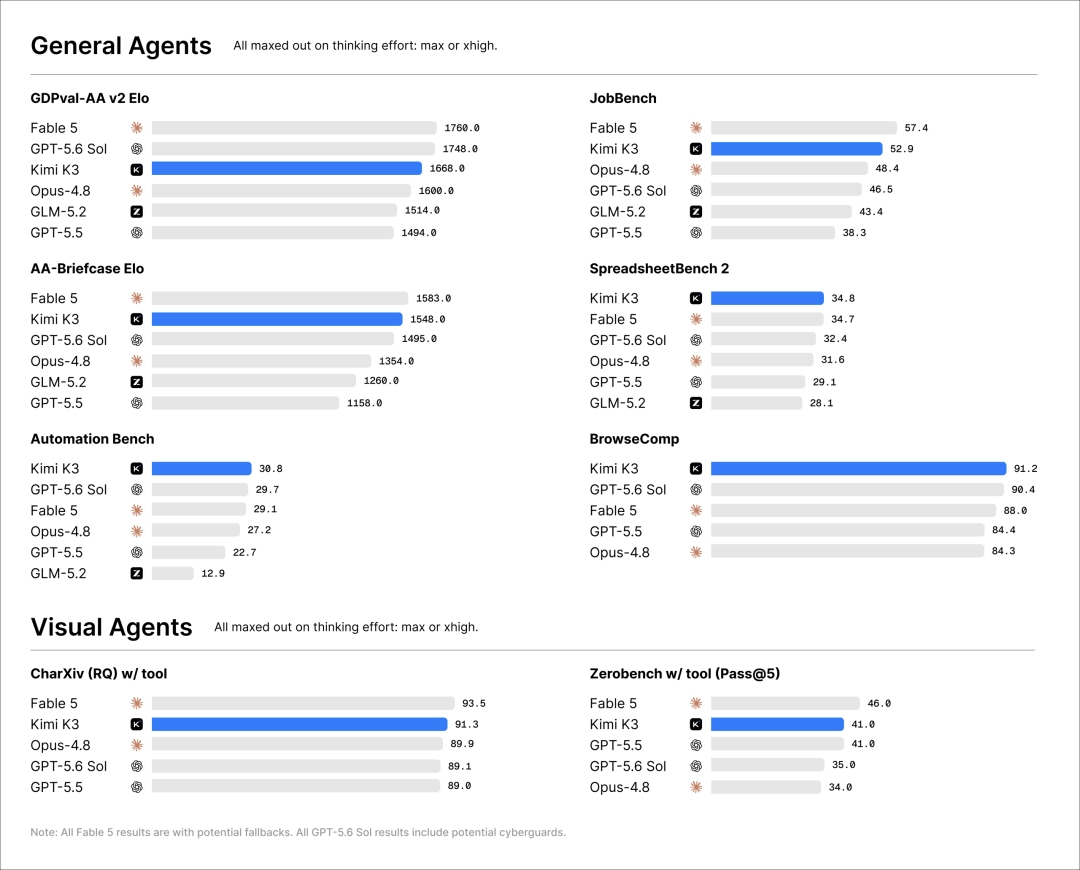
Moonshot’s launch evaluation also reports 88.3 on Terminal-Bench 2.1, 91.2 on BrowseComp, 95.0 on DeepSearchQA, and 93.5% on GPQA Diamond. These scores indicate the model’s intended strengths, but Kimi K3 was generally tested at maximum reasoning effort, and some model comparisons used different agent harnesses. Treat small score differences as directional rather than proof of universal superiority.
How to Use Kimi K3 on TokenHub
For developers asking how to use Kimi K3 without creating another provider-specific integration, TokenHub offers the model through its unified API gateway.
1. Create a TokenHub workspace
Open the TokenHub console and create a workspace with email or Google authentication.
2. Add usage balance
TokenHub uses a shared workspace balance across supported providers and models. Add enough balance for the test workload you plan to run.
3. Generate a TokenHub API key
Create a gateway key in the TokenHub console. Store the key as an environment variable rather than hard-coding it in your application.
export TOKENHUB_API_KEY="YOUR_TOKENHUB_API_KEY"4. Send a request with the OpenAI SDK
TokenHub provides an OpenAI-compatible API. Existing OpenAI SDK code can use Kimi K3 by changing the base URL, API key, and model ID.
import os
from openai import OpenAI

client = OpenAI(
    base_url="https://us-api.tokenhub.com/v1",
    api_key=os.environ["TOKENHUB_API_KEY"],
)

response = client.chat.completions.create(
    model="kimi-k3",
    messages=[
        {
            "role": "user",
            "content": "Review this function and identify any concurrency bugs.",
        }
    ],
)

print(response.choices[0].message.content)
On TokenHub, the model identifier is kimi-k3. Do not replace it with the k3 identifier used in some Kimi Code integrations unless the endpoint documentation specifically tells you to do so.
TokenHub also lists an Anthropic-compatible /v1/messages route. Use the endpoint and SDK style that matches the rest of your application.
Using Kimi K3 with OpenCode
Kimi K3 can power OpenCode through Kimi’s official Kimi For Coding login or through TokenHub. The official route uses a Kimi API key and the model ID k3; the TokenHub route below uses a TokenHub API key and kimi-k3.
Kimi K3 OpenCode setup through TokenHub
Because TokenHub exposes an OpenAI-compatible endpoint, it can be added as a custom OpenCode provider. First store the API key securely:
export TOKENHUB_API_KEY="YOUR_TOKENHUB_API_KEY"Then add a custom provider to opencode.json:
{
  "$schema": "https://opencode.ai/config.json",
  "provider": {
    "tokenhub": {
      "npm": "@ai-sdk/openai-compatible",
      "name": "TokenHub",
      "options": {
        "baseURL": "https://us-api.tokenhub.com/v1",
        "apiKey": "{env:TOKENHUB_API_KEY}"
      },
      "models": {
        "kimi-k3": {
          "name": "Kimi K3",
          "limit": {
            "context": 1048576,
            "output": 131072
          }
        }
      }
    }
  }
}
Start OpenCode and run /models to select TokenHub / Kimi K3. OpenCode’s provider configuration can change, so confirm the current custom-provider syntax in the OpenCode documentation if the model does not appear.
Kimi K3 Community Showcases
Community projects offer a more concrete view of what people are attempting with Kimi K3 than benchmark tables alone. These examples are demonstrations rather than controlled evaluations: the original prompts, iteration count, manual edits, tools, and hosting work may not be publicly documented.
Front-End Page Generation: A Windows XP Web Experience
A widely shared X post by AB Kuai.Dong highlights a browser-based Windows XP recreation reportedly built with Kimi K3. The post links to windows-xp.kimi.site and shows a familiar Windows XP desktop with interactive windows. Its accompanying video demonstrates Grand Theft Auto: Vice City running inside the web experience and says the project can also run Command & Conquer: Red Alert 2.
The post’s author presents the project as a step beyond another community-made macOS-style webpage. At the time reviewed, the X post displayed roughly 441,000 views, 2,489 likes, and 1,013 bookmarks, suggesting strong interest in Kimi K3’s front-end generation capabilities.
What the showcase demonstrates
- Recreation of a recognizable desktop operating-system interface
- Multiple layered windows and interactive UI states
- Integration of playable or streamed game experiences inside the webpage
- The ability to coordinate visual design, application logic, and a larger front-end codebase
What it does not prove
The public post does not disclose the full prompt history, source code, number of generations, manual corrections, or whether other models and tools contributed. It is therefore best treated as a community showcase of Kimi K3-assisted front-end development—not an independent Kimi K3 benchmark or proof that the model generated the entire project in one attempt.
Interactive 3D Scene Generation: A Lake Environment
Another community post from gimu shows a 3D lake environment created as part of the author’s Kimi K3 performance testing. The video presents a navigable landscape with reflective water, dense trees, surrounding mountains, and an on-screen atmosphere panel for adjusting environmental settings.
The creator says the quality of the lake, forest, and mountain scenery exceeded their expectations and concludes that the result is better than a previous Claude Fable 5 lake experiment included in the same post. At the time reviewed, the Kimi K3 post displayed approximately 212,000 views, 1,268 likes, and 555 bookmarks.
The “better than Fable 5” conclusion is the creator’s subjective assessment. The post does not publish a standardized scoring method, full prompts, source code, generation settings, or the amount of manual work involved, so it should not be treated as a controlled Kimi K3 vs Fable 5 benchmark.
Web Design Workflow: From Visual Research to a Finished Landing Page
In a community tutorial shared by Viktor Oddy, Kimi K3 is used in a roughly 13-minute workflow for creating what the author describes as an “award-winning” website. The video shows the creator gathering visual references and working through the design process before presenting a polished landing-page concept with bold typography, restrained monochrome illustration, clear navigation, and prominent calls to action.
This is a useful Kimi K3 web design showcase because it presents more than a final screenshot. It shows a practical workflow that moves from visual direction and reference gathering to page generation and iteration, making it relevant to designers, creative developers, and teams using AI for rapid website prototyping.
At the time reviewed, the post displayed approximately 107,000 views, 1,689 likes, and 2,223 bookmarks. The unusually high bookmark count suggests that readers found the tutorial useful as a repeatable workflow rather than only as a visual demo.
Kimi K3 vs Claude, Fable 5, Opus 4.8 and GLM-5.2
This table provides supporting context for the review. Community demos and benchmark scores are useful signals, but production decisions still require controlled testing on your own workload.
| Model | Primary positioning | Context | Openness | Notable strength | Main consideration |
|---|---|---|---|---|---|
| Kimi K3 | Multimodal coding, agents, and knowledge work | Up to 1M | Open-weight release announced | Long-context and visual agent workflows | New model with limited long-term production evidence |
| Claude Fable 5 | Difficult, sustained coding and professional work | Check current access tier | Closed | High-end knowledge work and long-running tasks | Closed platform and premium positioning |
| Claude Opus 4.8 | Frontier coding and reasoning | Check current API documentation | Closed | Mature agentic coding performance | Cost and provider dependency |
| GLM-5.2 | Open long-horizon engineering model | 1M | MIT-licensed weights | Flexible effort and open deployment | Trails the strongest closed models on some hard coding benchmarks |
Kimi K3 vs Fable 5
For searches such as Kimi K3 vs Fable or Kimi K3 vs Fable 5, Moonshot’s own launch positioning says Fable 5 remains stronger overall. Kimi K3 may be more attractive when open weights, a documented 1M context window, multimodal development, or API economics matter more; test both on the target workflow rather than assuming one wins every task.
Kimi K3 vs Claude
“Kimi K3 vs Claude” is a broad comparison because Claude includes several model tiers. Claude has a mature ecosystem and established coding workflows, while Kimi K3 emphasizes open weights, native vision, 1M context, and long-running agent tasks. Compare success rate, latency, tool reliability, and cost per completed task—not just token price.
Kimi K3 vs Opus 4.8
In Kimi K3 vs Opus 4.8, Opus is the more established production choice for advanced software engineering and agentic reasoning. Kimi K3 competes closely or leads on selected launch benchmarks, but it is the newer option for teams prioritizing long context, multimodality, and greater model openness.
Kimi K3 vs GLM-5.2
The Kimi K3 vs GLM 5.2 comparison is relevant because both target long-horizon work and support 1M-token context. GLM-5.2 offers MIT-licensed weights and selectable effort levels; Kimi K3 is much larger and emphasizes native vision and broader knowledge work. Their launch reports list 81.0 and 88.3 respectively on Terminal-Bench 2.1, but different evaluation details prevent treating that gap as a clean head-to-head result.
Kimi K3 API Price: Official API vs TokenHub
The Kimi K3 API price depends on where the model is accessed.
| Access method | Input per 1M tokens | Output per 1M tokens | Cached input/read per 1M tokens |
|---|---|---|---|
| Official Kimi API | $3.00 | $15.00 | $0.30 |
| TokenHub | $2.8571 | $14.2857 | $0.2857 |
TokenHub currently lists slightly lower effective prices than the official Kimi API. Pricing may change, so check the live model page before calculating production budgets.
For example, a TokenHub request using 100,000 uncached input tokens and 20,000 output tokens would cost approximately:
- Input:
0.1 × $2.8571 = $0.28571 - Output:
0.02 × $14.2857 = $0.285714 - Estimated total: approximately
$0.57
If the same 100,000 input tokens are billed as cache reads, the input portion falls to about $0.02857. Real agent costs can be higher because reasoning, tool results, retries, and long conversation histories increase token usage.
Kimi K3 Advantages
- 1M-token context for large repositories and document collections
- Native vision for screenshots, interfaces, and visual development
- Strong early results in coding, search, reasoning, and long-context evaluations
- OpenAI- and Anthropic-compatible routes through TokenHub
- Context caching and an announced open-weight release
Kimi K3 Limitations
- Limited production history and significant reliance on launch-period evaluations
- Results vary with reasoning effort, tools, and agent harness
- Deep reasoning and long context can increase latency and total cost
- Self-hosting a 2.8T-parameter model requires substantial infrastructure
- Long-context and tool-using agents still need retrieval checks, permissions, logging, and human review
Who Should Test Kimi K3?
Kimi K3 is most relevant for:
- Developers working with large repositories or coding agents
- Researchers synthesizing long document collections
- Front-end teams generating code from visual references
- Applications that repeatedly reuse cached context
- Teams evaluating open-weight alternatives through an OpenAI-compatible gateway
It may be unnecessary for short classification, extraction, or routine chat tasks that can be handled by a smaller and cheaper model.
Frequently Asked Questions
How do I use Kimi K3?
Use Kimi K3 through Kimi’s applications, the official API, Kimi Code, OpenCode, or TokenHub. On TokenHub, generate an API key and call kimi-k3 through https://us-api.tokenhub.com/v1.
Is Kimi K3 free?
Kimi offers a free membership tier, but K3 usage is credit-based and access limits depend on the current plan. API usage is not free: both the official Kimi API and TokenHub bill by token. TokenHub requires usage balance for paid model requests unless a separate promotion or trial credit is explicitly offered.
Where can I get a Kimi K3 API key?
For direct Moonshot access, create an API key in the Kimi API console. To access Kimi K3 alongside models from other providers, create a TokenHub API key in the TokenHub workspace. These keys belong to different services and are not interchangeable.
What model ID does Kimi K3 use?
TokenHub uses kimi-k3. Some Kimi Code and Kimi For Coding integrations use k3. Always use the identifier documented by the endpoint you are calling.
Does Kimi K3 work with OpenCode?
Yes. Use Kimi For Coding’s official login or configure TokenHub as a custom OpenAI-compatible provider with the kimi-k3 model ID.
Final Verdict: Should You Try Kimi K3?
Kimi K3’s specifications, early benchmarks, and community projects justify testing it on demanding workloads. The Windows XP showcase illustrates its front-end potential, but production evaluation should still measure task success, unsupported claims, latency, token usage, tool reliability, and required human correction.
Try Kimi K3 on TokenHub and run it against your own repository, documents, images, or agent workflow using one unified API key.